Roslyta Font Review
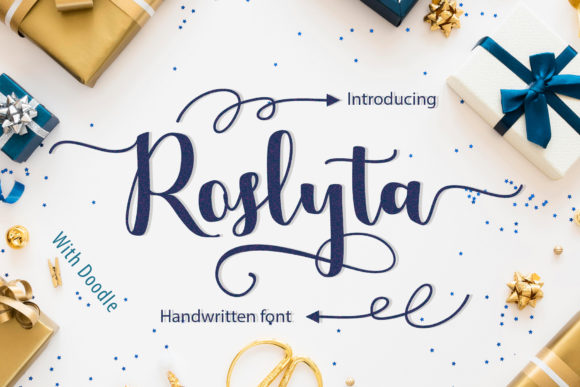
As a web designer, I’m always on the lookout for fonts that bring personality and visual interest to digital projects. Roslyta, a handwritten font with cute doodle elements, caught my eye during a recent website redesign for a boutique online store. Its joyful style adds a unique touch without overwhelming the design. Let me walk through how it performed in real web layouts.
First Impressions: A Handwritten Touch for Digital Design
When I first tested Roslyta on a hero section of a creative portfolio site, I was immediately drawn to its playful yet elegant character. The font’s natural flow and subtle doodles gave the design a handcrafted feel that stood out from more rigid typefaces. It felt like a breath of fresh air in a sea of standard sans serifs.
The font’s PUA encoding made it easy to access all the characters, which is a big plus when working on custom designs. I found myself using it for headings, buttons, and decorative accents—each time enhancing the visual storytelling of the site.
Web Usability: Readability and Responsive Performance
One of my main concerns with decorative fonts is how they perform on smaller screens. Roslyta handled mobile responsiveness well, maintaining legibility even at smaller sizes. I used it for a call-to-action button on a product landing page, and it looked clean and professional without any distortion.
On dark backgrounds, the font still held up, but I noticed that it worked best when paired with light or neutral tones. For instance, placing it over an image banner gave the text enough contrast to stand out without clashing with the background.
For body copy, I wouldn’t recommend using Roslyta—it’s too ornate for long paragraphs. But as a display font, it shines in headlines, section titles, and CTA buttons. It adds a personal, inviting tone that fits well with brands aiming for a friendly, approachable identity.
Design Applications: From Hero Sections to Branding
Roslyta proved versatile in different web design scenarios. On a coaching website, I used it for the homepage headline, where it added a warm, encouraging vibe. The font’s soft curves and gentle swashes made it ideal for creating a sense of trust and creativity.
In a digital brand kit, I paired Roslyta with a simple sans serif font for body text. This combination balanced the decorative elements of Roslyta with the clarity of the sans serif, resulting in a cohesive and professional look. It worked especially well for landing pages, where the font’s charm complemented the overall aesthetic without overpowering the message.
I also experimented with using Roslyta for a promotional landing page for a seasonal product. The font’s whimsical nature matched the theme perfectly, making the design feel more engaging and memorable.
Limitations and Considerations
While Roslyta is great for short phrases and headlines, it’s not suited for long-form content. In a recent project involving a blog redesign, I avoided using it for article titles and instead reserved it for section headers and subheadings. This kept the design organized while still allowing the font to shine where it mattered most.
Another thing to keep in mind is accessibility. Roslyta may not be the best choice for navigation menus or form labels, where clarity and consistency are key. For those areas, a simpler, more structured font would be a better fit.
It’s also important to check the font’s licensing before using it for commercial projects. Make sure you have the right to use it across different platforms and in various file formats, especially if you’re designing for clients or selling digital assets.
Final Thoughts: A Unique Addition to Any Web Project
Roslyta brings a refreshing, handmade quality to web design. Its cheerful style makes it perfect for creative websites, boutique stores, and branding projects that aim to connect emotionally with their audience. While it’s not a one-size-fits-all solution, it’s a powerful tool when used thoughtfully.
If you're looking for a font that adds personality and warmth to your digital work, Roslyta is definitely worth considering. Just remember to pair it wisely and test it across different screen sizes to ensure it performs well in every context.